
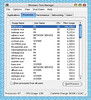
I can’t talk to much right know, but this so difficult to say, that my favorite browser eat all my memmory, and you see that? it’s eat almost a half of my memory, do you know how to fix it? please help me to solve this problem.

I can’t talk to much right know, but this so difficult to say, that my favorite browser eat all my memmory, and you see that? it’s eat almost a half of my memory, do you know how to fix it? please help me to solve this problem.
Tags:

mungkin ini bisa membantu.
In your location bar, type about:config and press Enter
Right-click on the screen to bring up a menu, click on New then choose Integer
A pop-up box will ask you for the “preference name”. Type in browser.cache.memory.capacity and click OK
Another pop-up box will appear – type in the number 60000
Close Firefox and restart the program.
No more memory leak!

Saya coba, dan sedikit membantu, gimana dengan kecepatan mas? maksud saya. ingin waktu Firefox di load wuzz wuzzz,
*catatan, saya memakai Mac OSX 10.4.1 di Intel Procesor
Sudah mencoba ini??
http://www.download.com/Optimizing-Firefox/1200-20_4-5159142.html?tag=cnetfd.sd

venuz sama udin, sama-sama dari malang aja pake tanya di blog. Tanya di offline aja, toh sama-sama kerja di daerah araya toh? 😀
2006 - 2025 NURUDIN JAUHARI


Leave a Comment