
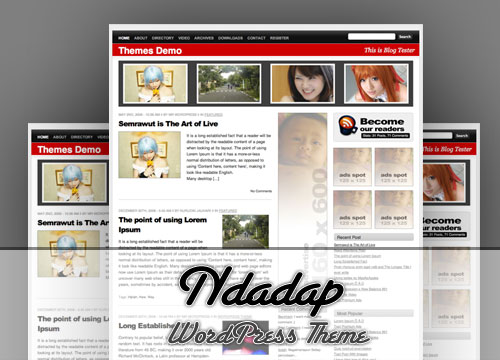
Ndadap is Unique WordPress theme, we created Ndadap with easy to install and easy to use. This theme contain very minimum configuration to make it work. Ndadap also support many plugin. Ndadap also widget enabled for unlimited content. Ndadap buil in Featured Content Area with auto grab image from the content. So you doesn’t need to add custom field on your content.

But, if you want more perfect Featured Image, you can add it via Custom Field. The custom Field for featured image is feature_image and paste you image url
What’s on in Ndadap WordPress Theme
- WordPress 2.7 Support (Threaded Comment with separate Comment and Pingbacks)
- Rounded Corner
- Gradient Style and nicely dotted background effect
- Built In Featured Post area.
- Auto Grabbed Image from to content (no custom field needed)
- Auto Re size image
- Widget Support
- AdSense support
- Magazine Style
- Grid Based Layout
- SEO Friendly
- Work Perfect on Standard Browser (if you are using Internet Explorer, I can’t give guarantee this theme will work)
- Say Goodby for Internet Explorer

- And many more.
Some Plugin Needed
- FlickrRSS
- Popularity Contest (fix version can be found on this blog)
- Get Recent Comment
- Buy Me a Beer
Download Ndadap
[download#42]
Demo Ndadap
You can check Ndadap Demo now
F.A.Q
How To Setup Featured Post?
It’s easy, open header.php and find this area
[sourcecode language=”php”]<?php
$sticky=get_option(‘sticky_posts’);
$args1=array(
‘caller_get_posts’=>1,
‘post__not_in’ => $sticky,
‘posts_per_page’=>4,
‘category_name’ => ‘featured’,
);
$my_query1 = new WP_Query($args1);
while ($my_query1->have_posts()) : $my_query1->the_post(); ?>[/sourcecode]
This code around line 105 and on category_name, change with you Category Name that you want display as Featured Post.
How To Replaced Auto Grabed Image with custom field?
If you want replaced auto grabbed image with another image, you can use Custom Field, just add featured_image custom field and put your image URL and you are done
How To Change Default Favicon?
You can follow this favicon tips and trick
I want more custom on this theme?
Contact me and let’s discuss it.
Happy with this theme
Why not sent me some donation? I will glad to put your name on my donation list.

sedot dulu boz…
mantabsssssssssss
numpang donlot ….
I like it, I love it, I want some more of it…
Awesome theme and just what I was looking for, for my next project. And its 2.8 compatible!
Of course is it WordPress 2.8 compatible
apik tenan pak… 🙂
Bung Nurudin Jauhari
saya ingin coba pakai WordPress dan template anda Ndadap
saya 3 kali download file Ndadap
saya masukkan ini ke folder wp-content/themes
Kok setelah di expand, keluar folder yang namanya _MacOS dan isinya file file dengan nama _xxx dengan size 0
dan theme Ndadap nggak muncul sbg theme di control panel
terima kasih atas bantuannya
ada bugs sepertinya mas pas saya pake di wp 2.8
thumb di hal utama tidak muncul gambarnya
mohon koreksinya
Iya nih mas, saya juga pake di Blog ini. Home page ga bisa muncul Thumbnail image.
Makasih
saya coba dulu mas..kelihatannya bagus nih..
Great theme..Mc Jauhari. I will use it.
saia udah masang nih theme, tapi kok scroll gambar yang ada di header kok gak ada ya mas?
juga plugin popularity contestnya gak bisa digunain!
Mohon ‘ilham’nya dikit 😛
Follow this step How to Fix Popularity Contest
Hi, an interesting theme, Thanks for excellent work. I have translated this template on Russian and have laid out for free to download at myself on a blog. To look it is possible here: http://www.wpcredo.ru/?p=1294
PS.РуÑифицированную верÑию темы Ndadap можно Ñкачать у Ð¼ÐµÐ½Ñ Ð½Ð° блоге
Okay, so where is the download link? I’d love to give this a try, but cannot find a link on this page. There’s the ‘Download Ndadap’ text, but it doesn’t link anywhere.
Love the theme. I’m having some trouble with using a featured image custom field. I have created a custom field called featured_image and added the path to the image, but for some reason it just isn’t working. Help?
I am having trouble using the ‘featured_image’ custom field. I have entered the name and the link to the image but I can not get it to show up. Help?
Hi Jauhari ! Congratulations for one of the best WordPress themes around there. You did a piece of art.
What about make this one i8n? I can help you to translate it to Portuguese.
And a little suggestion – what about to make a slideshow in “Featured Post area” ?
Regards,
Neto
PS: I’ve sent you some Brazilian coffee…
You can follow guide our Ndadap F.A.Q
Has anyone tried the “buy me a beer” plugin? I think I might have to try it out.
Please try it 😉
kereeen mantap abis… sukses buat bung jauhari
Mas, kok di blogku ga muncul image di home page nya yah?
Padahal kalo di LocalHost bisa muncul image meskipun yang muncul NoImage.
Apa serverku yang ga support?
eh, saya pake wp 2.9.1
Makasih bantuannya
Hi there,
Is there anyway to make this theme use only one sidebar (the right one), instead using 2 sidebars?
Thanks,
Bogdan
mantap deh……perlu di coba dlu ni…..
mas jika mau seting plugin FlickrRSS nya biar hasilnya nanti seperti yang ada di demo, gimana mas, coz punya saya hasilnya thumbnailnya saling berdempetan atau gandengan..
Wah, bisa cari duit nich dengan jualan themesnya mas ^_^. Jadi terinspirasi nih ^_^, thax ya. Saya suka blogging terutama wordpress, saya juga hidup dari blogging, thxs dah share dan berbagi, sukses selalu ^_^
Ijin nyedot mas.
Nice thema. I would use that.
templatenya manteb mas….. ijin ngambil trus pakai…
If its as good as wordpress.. and Im not sure if it is then I will definately take a look.
Anyone get the “featured_image” to work? I’ve tried several different variations and I’m not exactly sure where you’re supposed to put it. If someone could answer this for me.
Thanks
Aku juga ikutan download ah Mas…
Lama gak download koleksi suhu satu ini..
Terima kasih
Saya sangat suka themes buatan anda. menarik dan sudah disediakan tempat untuk memasang iklan bila ingin mencari tambahan penghasilan lewat blog.
Saya rasa anda sangat mengerti kebutuhan blogger nih…
Like Ndadap themes !!
ijin sedot mas..langsung coba pakai ahh,, trims sharenya bang 🙂
ijin nyedot mas bro,temen ada yang rekomendasi saya cb dulu..maturnuwun
nice themes thanks