
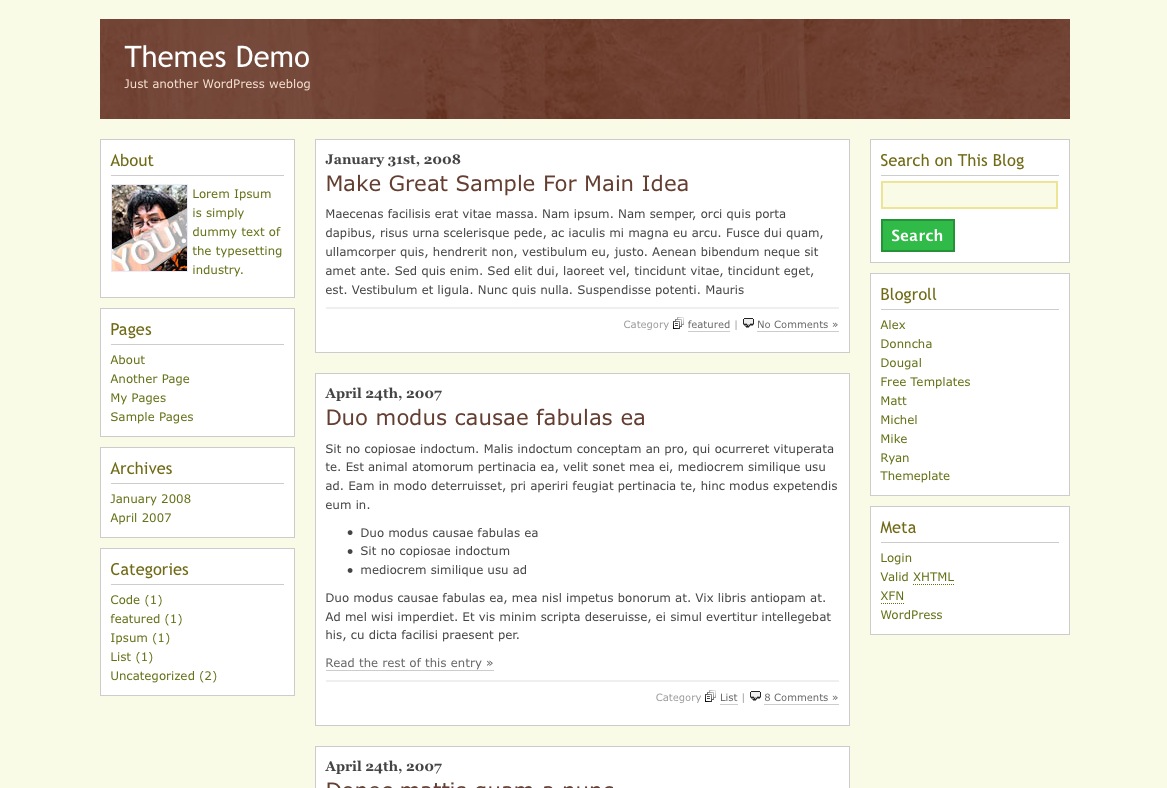

Our Goal is make Kotak Theme easy use and good on our readers. You can download and use it for free
What’s on this theme.
- 3 Colums Layout
- Widget Ready
- Left and Right Sidebar
- WordPress 2.1, 2.2, 2.3 and 2.5 Ready

Download Now (download counter reset on 13 January 2009)
[download#2]
Demo This Theme
Click Here to Demo This Theme

I’m setting up Kotak, but I cannot find the file that has About – Lorem ipsum so that I can change it.
I’ve gone through every file and cannot find it.
Will you help me?
Thanks
You can find it on function.php, there are some text and url for new avatar image that need to edit.
I hope this info, solve you problem.
Hello Jauhari,
I just added your KOTAK 2.0 theme to my page and it’s very good.
Thank you very much for making it and for letting people download it.
I’m having a slight problem on my sight with KOTAK displaying image/photos.
They are all now displaying to the extreme RIGHT SIDE of any post containing an image/photo.
http://timdotnet.net/wiggumdaily/
Previously they stayed where I put them when creating the posts in my WYSIWYG editor.
(I know that coding gurus like you must hate dummies like me that use WYSIWYG to create posts, but it’s what works for me)
The problem occurs for existing posts and for any new ones I’ve created with image/photos since switching over to your theme.
I can switch back to the previous theme (EARTHY) and everything goes back to looking “normal” the way it was originally created.
http://www.nikhedonia.com/showcase/entry/earthy/
http://www.nikhedonia.com/work/free_templates/earthy/
These are two examples of posts BEFORE and AFTER Kotak 2.0
http://farm1.static.flickr.com/230/467225127_b21d0babe9_o.jpg
http://farm1.static.flickr.com/206/467225143_340165cc72_o.jpg
http://farm1.static.flickr.com/213/467225153_89c0bab781_o.jpg
http://farm1.static.flickr.com/229/467225155_a16daed35c_o.jpg
You can see that even the smilies are being moved to the extreme right side of the KOTAK posts.
I’m sure it’s something simple that I just need to adjust maybe in the stylesheet.css of your KOTAK theme ? But as I said, I’m not a coding legend like you, so I need some help (please) 🙂
Thank You for your efforts and help.
Tim…
Hi Tim,
About change picture float is easy, just open style.css on Kotak theme than find this line
.post a img, .post img {

	border: none;

	float: right;

	padding-left: 5px;

}
After you found that line, delete all that line and test again.
I hope this will fix on you error, if you still have another question, just drop you comment again 🙂
Can I put both columns on the right and then left justify the blog post ? i love everything about the layout, the way the blogroll looks, and the quotes and so forth…. but can I change the columns?
Of course you can do it MichelleVan, all need to do just know little bit about XHTML and CSS then edit it manually. :)>-
But if you still don’t understand about it, just drop your contact to me, and I will help you.
Thanks for using my Kotak theme.
I am novice with wordpress. want to know if I can use your template in a free version of wordpress. Currently, I have a blogspot site and published as http://www.thestockeditor.com
Thanks
Bratin
Free Version of WordPress? did you mean WordPress.com? if you want available on wordpress.com. There are two options,
– Request to WordPress.com admin to add Kotak on their themes list
– Or Upgraded your WordPress.com to make custom themes
Kotak not yet released on other Platform.
Maybe I will released under blogger too if some one needed 😉
Jauhari, great themes!
I have a question regarding the Kotak theme.
I’m in the process of modifying it a bit and want to make my header image clickable and return me back to the home page. I’m a bit of a novice with code, and tried a bunch of things and none worked.
How do I do it?
Thanks!
Hi,
how can I change the “About” section?
Tks
Hey Man
Very nice theme. simple yet attractive. Got a query.
How do I modify the About section on the home page containing ” Lorem Ipsum is simply…. ”
I am sorry but i am a novice with the code so if it has already been answered.
hello sir,
many thx for a fantastic theme –
I only had one problem (as a few others it seems):
how do I handle this about thing…??
cant find it neither…
any chance on a little feedback there..?? 😉
would be grt !!
thx a lot
Awesome Jauhari!
Thanks much
Jauhari, great themes!
hi jauhari,i looking for your black theme created by you, but i forget theme name, i look in your theme collection but i can find it. :(
i need black theme, simple for adsense blog,
would you email me your theme list? i can’t find your index site.
tahnks
You can check it on https://www.jauhari.net/themes/
It is SEO Friendly?
Thanks in advance.
Nice simple template anyway…
I’m setting up Kotak, but I cannot find the file that has About — Lorem ipsum so that I can change it.
thanks .
It is SEO Friendly?
i need white theme, simple for adsense blog,
would you email me your theme list? i can’t find your index site.
Thanks
Theme yang simple…
eye catching pula…Soeednya juga luayan bagus….
Coba dulu.
Yeah, You can find it on function.php,
Keren theme kotaknya..
Fast load banget…
Mantab…
A financial planner could make you realize where exactly
you needed gone wrong so that you wil tend not to commit the same errors
inside the future. It offers different counseling specialties foor
people, partners and families including:. Therefore, foor those who ave less than perfect fico scores, don’t opt to apply for a card
that’s created forr somebody that has perefect ico scores.